Home Email Support Questions FAQ EMAIL HELP: EMAIL GOING TO THE RECEIVER…

FAQ EMAIL HELP: EMAIL GOING TO THE RECEIVER SPAM FOLDER OR NOT DELIVERED

Email Support Questions 4 March 2022 3 min read By Eddie van der Walt
FAQ EMAIL HELP: EMAIL GOING TO THE RECEIVER SPAM FOLDER OR NOT DELIVERED

What to do when your  email is going to the spam folder of the person you are sending to or not being delivered.

Emails (business mail and excluding newsletters & mass mailers) for my users get send to spam folders mainly for 4 reasons :

#1 – THE MAIL SERVER

The setup of the mail server and what it allows its users to do determine the “credibility” or spam history of the server.  in order to protect our server “good name” we:

  • Require mail users to log in with a valid username & password before sending an email.
  • We do not allow users to send more than 500 emails per hour.
  • We monitor our server IP & name on all available blacklists to take preventative action when a problem does happen.

#2 – EMAIL CONTENT (DO’S & DON’T)

  • Send the same mail to less than 50 people at a time
  • Send less than 500 emails per hour (we have a newsletter service that uses an external gateway to safely send thousands of emails without effecting the server and our mail users).
  • Convert attachments (Word & Excel) to PDF before sending (more & more servers will not accept word & excel files due to virus infections)
  • Upload files and mostly large files to online storage like dropbox & send a link.
  • Don’t forward emails marked as Spam
  • Make sure you have Antivirus AND Anti-malware software on your computers.

#3 – YOUR OUTGOING IP

Every computer on the internet is linked to an IP address (it like a phone number) which is used to track where a message was sent from.   That IP is allocated to your computer or the network you are working on by your ISP and can change after a certain period.

To get your IP, search on Google, “what is my IP”.

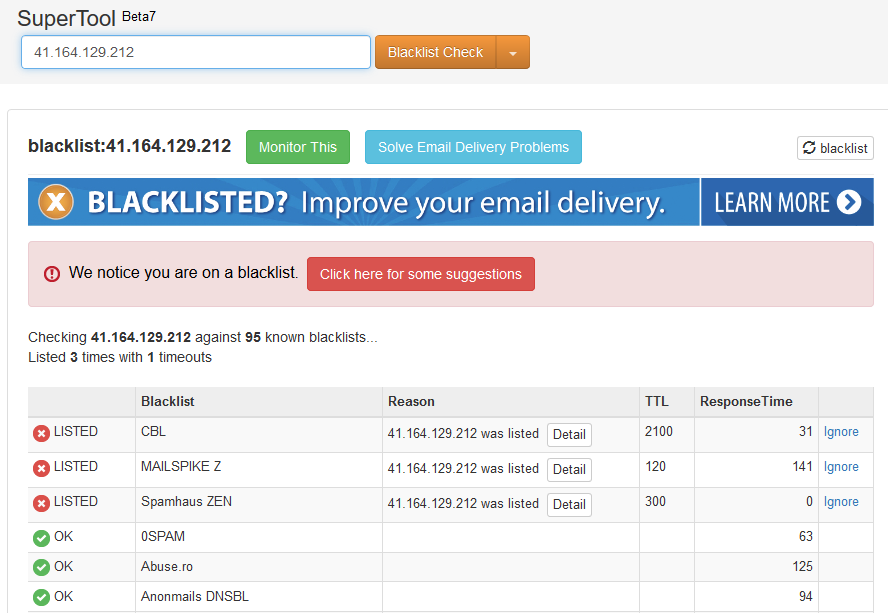
Now if a computer on your network gets infected with malware and start to send a 100 000 emails, the internet will look at the IP and add that address to a blacklist and most mail servers will check and update their blacklist settings. 

If an email is received the mail server will check if the sending computer is working on a blacklisted IP.  That mail server can then decide to:

  • Refuse to accept the email
  • Mark the email as SPAM to warn the receiver, but still, send the email
  • Move the email to the receivers SPAM folder.

If you find out that your emails are not being delivered or moved to the receivers SPAM folder:

  • Check your IP by searching on Google, “what is my IP”.
  • Copy that IP address and search on a blacklist IP website if your IP was blacklisted.  I use MXToolbox

If your IP is listed, contact your ISP to get the IP removed.

Eddie van der Walt — FAQ
Written by
Eddie van der Walt

With 27 years in online marketing, SEO, e-commerce infrastructure, and server management, Eddie is the founder of FAQ — a managed e-commerce partnership built on the principle that your partner earns more only when your shop sells more. He's hands-on across the full stack: from CloudLinux hosting environments to WooCommerce conversion optimisation and FluentCRM automation. Every article here comes from live experience running real online shops.

More articles by Eddie
Stay ahead of the curve

E-commerce insights
in your inbox.

New articles on WooCommerce, SEO, online auctions, and sales strategy — straight from the team running live shops every day. No noise. Unsubscribe anytime.

Subscription Form v2

Unlock Your Online Sales Potential with "Online Sales FAQ"!

Join our exclusive monthly newsletter, "Online Sales FAQ," and transform your online business. Stay updated with the latest tools, get inspired by real-world solutions, and gain the competitive edge you need to succeed.

Unsubscribe with one click & at any time

No spam Unsubscribe anytime Your data stays with you

We build and run your entire online infrastructure.

Here's why you can trust us with the keys.

27 years of shipping real results

We've been building WooCommerce stores, auctions, and high-growth e-commerce systems since most agencies still thought "online shop" meant a basic brochure site.

Your stuff stays yours

Products, customer data, domain, brand assets — all of it. If you ever leave (with accounts settled), we hand everything over cleanly. We only keep our own code and configs, and that's stated upfront in the contract. No surprises. No hidden clauses.

Security isn't optional

We maintain full admin control over servers and sites. This isn't a power move — it's required for the shared infrastructure and SLAs we guarantee. Enterprise-grade hardening, automated backups, real-time malware scanning, and constant monitoring come standard. Performance and protection without the headaches.

Everything in writing

Commission rates, thresholds, deliverables — all signed before we touch a single file. Verbal promises don't exist here.

We only say yes when we believe it will work

293 active partners. 90%+ retention over decades. If we don't see a clear path to success for your business, we'll tell you upfront — not after months of wasted time.

🤝 Find us on social

We're not a faceless operation. Find FAQ across these platforms — same team, same people, same Eddie.